Store and Visualize SwitchBot CO2 Data (Miniviz / Raspberry Pi)
What We’ll Do
Send data from a SwitchBot CO2 sensor to Miniviz, store temperature, humidity, and CO2 concentration in the database, and create graphs. You can check data in the SwitchBot app as well, but sending it to Miniviz gives you more flexibility for visualization and automation.
Since the API integration does not provide temperature and humidity values, this guide uses BLE to read the sensor data.
What Is Miniviz?
Miniviz is a service that makes it easy to visualize IoT data. Just send your IoT data, and you can quickly check it from your smartphone.
Example Use Cases
- Graph CO2, temperature, and humidity
- Monitor greenhouse environments in agriculture
- Compare and manage CO2 levels across multiple rooms
- Trigger webhooks or run fans based on CO2, temperature, or humidity
Required Items
- Raspberry Pi (such as Raspberry Pi 3 B+ or Zero 2 W)
- SwitchBot CO2 sensor
- Miniviz project ID and token
Get Your Miniviz Project ID and Token
Create a project, then check the project details screen to get your project ID and token. For more information, see Quick Start.
Steps
- Get the CO2 sensor device ID from a local PC
- Create a script that sends data to Miniviz
- Run the script continuously on Raspberry Pi
- Check the database and graphs in Miniviz
1. Receive BLE Advertisements and Get the Device ID
First, get the sensor’s device ID. Run the following script on your local PC and watch for BLE advertisements from the nearby SwitchBot CO2 sensor.
Device ID Detection Script
import asyncio
from dataclasses import dataclass
import json
import time
from typing import Dict, Optional

from bleak import BleakScanner
from bleak.exc import BleakError


def _hex(b: bytes) -> str:
    return b.hex()


def decode_meter_like(rest: bytes) -> Optional[dict]:
    """
    Tentatively decode temperature / humidity / CO2 from rest
    based on meter_sw.md.
    """
    if len(rest) < 8:
        return None

    b3 = rest[2]
    b4 = rest[3]
    b5 = rest[4]

    temp_dec = b3 & 0x0F
    temp_sign = 1 if (b4 & 0x80) else -1
    temp_int = b4 & 0x7F
    temperature_c = temp_sign * (temp_int + temp_dec / 10.0)

    humidity = b5 & 0x7F
    co2 = int.from_bytes(rest[6:8], "little", signed=False)

    return {
        "temperature_c": temperature_c,
        "humidity": humidity,
        "co2": co2,
        "raw": rest.hex(),
        "b3": b3,
        "b4": b4,
        "b5": b5,
    }


@dataclass
class Seen:
    address: str
    name: str
    rssi: Optional[int]
    manufacturer_data: Dict[int, str]
    service_data: Dict[str, str]
    service_uuids: str


# settings
TARGET_DEVICE_ID = ""  # SwitchBot CO2 sensor device ID

NAME_CONTAINS = ""
SCAN_SECONDS = 30
SCAN_FOREVER = False
SKIP_APPLE = True
PRINT_ONLY_ON_CHANGE = True
SWITCHBOT_MFR_ID = 0x0969
ONLY_SWITCHBOT = True
DEBUG_RAW = True


async def main() -> None:
    seen: Dict[str, Seen] = {}
    last_fp: Dict[str, str] = {}

    def callback(device, adv_data):
        name = (adv_data.local_name or device.name or "").strip()
        if NAME_CONTAINS and NAME_CONTAINS.lower() not in name.lower():
            return

        rssi = getattr(adv_data, "rssi", None)
        if rssi is None:
            rssi = getattr(device, "rssi", None)

        raw_md = adv_data.manufacturer_data or {}

        if ONLY_SWITCHBOT and SWITCHBOT_MFR_ID not in raw_md:
            return

        if SKIP_APPLE and 76 in raw_md and SWITCHBOT_MFR_ID not in raw_md:
            return

        md = {k: _hex(v) for k, v in raw_md.items()}
        sd = {k: _hex(v) for k, v in (adv_data.service_data or {}).items()}
        su = ",".join(adv_data.service_uuids or [])

        fp = f"{name}|{rssi}|{md.get(SWITCHBOT_MFR_ID)}|{sd.get('0000fd3d-0000-1000-8000-00805f9b34fb')}"
        if PRINT_ONLY_ON_CHANGE and last_fp.get(device.address) == fp:
            return
        last_fp[device.address] = fp

        seen[device.address] = Seen(
            address=device.address,
            name=name or "(no name)",
            rssi=rssi,
            manufacturer_data=md,
            service_data=sd,
            service_uuids=su,
        )

        if SWITCHBOT_MFR_ID in md:
            v = md[SWITCHBOT_MFR_ID]
            raw = bytes.fromhex(v)
            if len(raw) >= 6:
                dev_id = raw[:6].hex().upper()
                rest = raw[6:]
                if TARGET_DEVICE_ID and dev_id != TARGET_DEVICE_ID:
                    return

                decoded = decode_meter_like(rest)
                if not decoded:
                    return

                batt = None
                fd3d_hex = sd.get("0000fd3d-0000-1000-8000-00805f9b34fb")
                if fd3d_hex:
                    raw_sd = bytes.fromhex(fd3d_hex)
                    if raw_sd:
                        batt = raw_sd[-1] & 0x7F

                out = {
                    "ts_ms": int(time.time() * 1000),
                    "dev_id": dev_id,
                    "temp_c": round(decoded["temperature_c"], 1),
                    "humidity": decoded["humidity"],
                    "co2": decoded["co2"],
                    "battery": batt,
                    "rssi": rssi,
                }
                if DEBUG_RAW:
                    out["rest_hex"] = rest.hex()
                    out["fd3d"] = fd3d_hex
                print(json.dumps(out, ensure_ascii=False))

    mode = "forever" if SCAN_FOREVER else f"{SCAN_SECONDS}s"
    print(f"Scanning... ({mode}) device_id={TARGET_DEVICE_ID or '(any)'}")
    async with BleakScanner(detection_callback=callback):
        if SCAN_FOREVER:
            while True:
                await asyncio.sleep(3600)
        else:
            await asyncio.sleep(SCAN_SECONDS)

    if not seen:
        print("No advertisements found. Try running closer to the sensor or wake the sensor by pressing its button.")


if __name__ == "__main__":
    try:
        asyncio.run(main())
    except BleakError as e:
        msg = str(e)
        print("\n[BLEAK ERROR]", msg)
        if "not authorized" in msg.lower():
            print(
                "\nBluetooth permission is not granted on macOS. Please check the following:\n"
                "- System Settings -> Privacy & Security -> Bluetooth\n"
                "  Turn on the app you are using to run this script (Terminal / iTerm / Cursor, etc.)\n"
                "- Restart your terminal and run the script again\n"
                "\nNote: Permission is often tied to the application that launched Python, not Python itself."
            )
        raise
Example Output
When you run it, nearby devices should appear. Save the value of "dev_id": "AABBCCDDEEFF".
python3 sw_ble_adv_scan.py
{"ts_ms": 1773046541493, "dev_id": "AABBCCDDEEFF", "temp_c": 19.4, "humidity": 45, "co2": 268, "battery": null, "rssi": -78, "rest_hex": "116404932d000c01b700", "fd3d": null}
2. Send Data to Miniviz
Configuration
Fill in the configuration values in the script.
# ===== User settings =====
MINIVIZ_API_URL = "https://api.miniviz.net"
MINIVIZ_PROJECT_ID = "PROJECT_ID"  # Miniviz project ID
MINIVIZ_TOKEN = "PROJECT_TOKEN"  # Token

# Label key shown in Miniviz (device name, installation location, etc.)
LABEL_KEY = "switchbot_meterpro_co2"

# 60 seconds for Free, 15 seconds for Pro (120 seconds in this example)
SEND_INTERVAL_SECONDS = 120

# SwitchBot BLE
SWITCHBOT_MFR_ID = 0x0969
TARGET_DEVICE_ID = "TARGET_DEVICE_ID"  # Device ID obtained above
# ===== End settings =====
Sender Script
"""
POST values obtained from SwitchBot MeterPro (CO2) BLE advertisements to Miniviz.

Requirements:
  pip install bleak requests

Miniviz API:
  POST https://api.miniviz.net/api/project/{project_id}?token={token}
"""

import asyncio
import base64
import hashlib
import hmac
import json
import time
from dataclasses import dataclass
from datetime import datetime, timezone
from typing import Dict, Optional

import requests
from bleak import BleakScanner


# ===== User settings =====
MINIVIZ_API_URL = "https://api.miniviz.net"
MINIVIZ_PROJECT_ID = "PROJECT_ID"
MINIVIZ_TOKEN = "PROJECT_TOKEN"

# Label key shown in Miniviz (device name, installation location, etc.)
LABEL_KEY = "switchbot_meterpro_co2"

# 60 seconds for Free, 15 seconds for Pro (120 seconds in this example)
SEND_INTERVAL_SECONDS = 120

# SwitchBot BLE
SWITCHBOT_MFR_ID = 0x0969
TARGET_DEVICE_ID = "TARGET_DEVICE_ID"  # Leave empty to use the first detected 0x0969 device
# ===== End settings =====


def decode_meter_like(rest: bytes) -> Optional[dict]:
    """
    Decode temperature / humidity based on SwitchBotAPI-BLE meter.md.
    Observations suggest CO2 is stored in rest[6:8] as little-endian.
    """
    if len(rest) < 8:
        return None

    # meter.md: Byte3=fraction (lower 4 bits), Byte4=sign+integer, Byte5=humidity (lower 7 bits)
    b3 = rest[2]
    b4 = rest[3]
    b5 = rest[4]

    temp_dec = b3 & 0x0F
    temp_sign = 1 if (b4 & 0x80) else -1
    temp_int = b4 & 0x7F
    temperature_c = temp_sign * (temp_int + temp_dec / 10.0)

    humidity = b5 & 0x7F
    co2 = int.from_bytes(rest[6:8], "little", signed=False)

    return {"temperature_c": temperature_c, "humidity": humidity, "co2": co2}


@dataclass
class Reading:
    dev_id: str
    temperature_c: float
    humidity: int
    co2: int
    battery: Optional[int]
    rssi: Optional[int]


async def read_once_from_ble() -> Reading:
    """
    Capture one 0x0969 advertisement and return it as a Reading.
    Waits up to 30 seconds.
    """
    found: Optional[Reading] = None

    def callback(device, adv_data):
        nonlocal found
        if found is not None:
            return

        raw_md = adv_data.manufacturer_data or {}
        if SWITCHBOT_MFR_ID not in raw_md:
            return

        raw = raw_md[SWITCHBOT_MFR_ID]
        if len(raw) < 6:
            return

        dev_id = raw[:6].hex().upper()
        if TARGET_DEVICE_ID and dev_id != TARGET_DEVICE_ID:
            return

        rest = raw[6:]
        decoded = decode_meter_like(rest)
        if not decoded:
            return

        # Battery: last byte of service_data fd3d (& 0x7F)
        battery = None
        fd3d_uuid = "0000fd3d-0000-1000-8000-00805f9b34fb"
        sd = adv_data.service_data or {}
        if fd3d_uuid in sd and sd[fd3d_uuid]:
            battery = sd[fd3d_uuid][-1] & 0x7F

        rssi = getattr(adv_data, "rssi", None)
        if rssi is None:
            rssi = getattr(device, "rssi", None)

        found = Reading(
            dev_id=dev_id,
            temperature_c=float(decoded["temperature_c"]),
            humidity=int(decoded["humidity"]),
            co2=int(decoded["co2"]),
            battery=battery,
            rssi=rssi,
        )

    async with BleakScanner(detection_callback=callback):
        # Wait up to 30 seconds
        for _ in range(30):
            if found is not None:
                break
            await asyncio.sleep(1)

    if found is None:
        raise RuntimeError("BLE advertisement was not found. Try running closer to the sensor or wake the sensor by pressing its button.")
    return found


def post_to_miniviz(reading: Reading) -> None:
    url = f"{MINIVIZ_API_URL}/api/project/{MINIVIZ_PROJECT_ID}?token={MINIVIZ_TOKEN}"
    timestamp_ms = int(datetime.now(timezone.utc).timestamp() * 1000)

    payload: Dict[str, object] = {
        "temperature": round(reading.temperature_c, 1),
        "humidity": reading.humidity,
        "co2": reading.co2,
    }
    # Optional fields (keep total key count within 8)
    if reading.battery is not None:
        payload["battery"] = reading.battery
    if reading.rssi is not None:
        payload["rssi"] = reading.rssi

    body = {"timestamp": timestamp_ms, "label_key": LABEL_KEY, "payload": payload}

    r = requests.post(url, json=body, timeout=20)
    if r.status_code == 429:
        retry_after = int(r.headers.get("Retry-After", "60"))
        raise RuntimeError(f"Miniviz rate limit (429). Retry-After={retry_after}")
    r.raise_for_status()
    print(r.json())


def main() -> None:
    print("Starting BLE -> Miniviz sender (Ctrl+C to stop)")
    while True:
        try:
            reading = asyncio.run(read_once_from_ble())
            print(
                json.dumps(
                    {
                        "dev_id": reading.dev_id,
                        "temperature": round(reading.temperature_c, 1),
                        "humidity": reading.humidity,
                        "co2": reading.co2,
                        "battery": reading.battery,
                        "rssi": reading.rssi,
                    },
                    ensure_ascii=False,
                )
            )
            post_to_miniviz(reading)
            time.sleep(SEND_INTERVAL_SECONDS)
        except KeyboardInterrupt:
            print("Stopped.")
            return
        except Exception as e:
            msg = str(e)
            print(f"[ERROR] {msg}")
            # Wait a bit if 429 is returned
            if "Retry-After=" in msg:
                try:
                    retry_after = int(msg.split("Retry-After=")[-1].strip())
                except Exception:
                    retry_after = SEND_INTERVAL_SECONDS
                time.sleep(max(retry_after, SEND_INTERVAL_SECONDS))
            else:
                time.sleep(5)


if __name__ == "__main__":
    main()
3. Run It Continuously on Raspberry Pi
Use a systemd unit so the script starts automatically when Raspberry Pi boots.
1. Place the Script
sudo mkdir -p /opt/miniviz
sudo nano /opt/miniviz/miniviz_raspi_swbot_co2.py
sudo chmod +x /opt/miniviz/miniviz_raspi_swbot_co2.py
2. Install Python Libraries
sudo pip3 install bleak requests --break-system-packages
3. Create a systemd Unit
sudo nano /etc/systemd/system/miniviz-co2.service
[Unit]
Description=Miniviz SwitchBot MeterPro CO2 BLE Sender
After=bluetooth.target network-online.target
Wants=network-online.target

[Service]
Type=simple
User=pi
ExecStartPre=/usr/bin/bluetoothctl power on
ExecStart=/usr/bin/python3 /opt/miniviz/miniviz_raspi_swbot_co2.py
Restart=always
RestartSec=10
StandardOutput=journal
StandardError=journal

AmbientCapabilities=CAP_NET_RAW CAP_NET_ADMIN
CapabilityBoundingSet=CAP_NET_RAW CAP_NET_ADMIN

[Install]
WantedBy=multi-user.target
4. Reload and Start systemd
sudo systemctl daemon-reload
sudo systemctl enable miniviz-co2
sudo systemctl start miniviz-co2
4. Check Data and Visualize in Miniviz
Check the Database
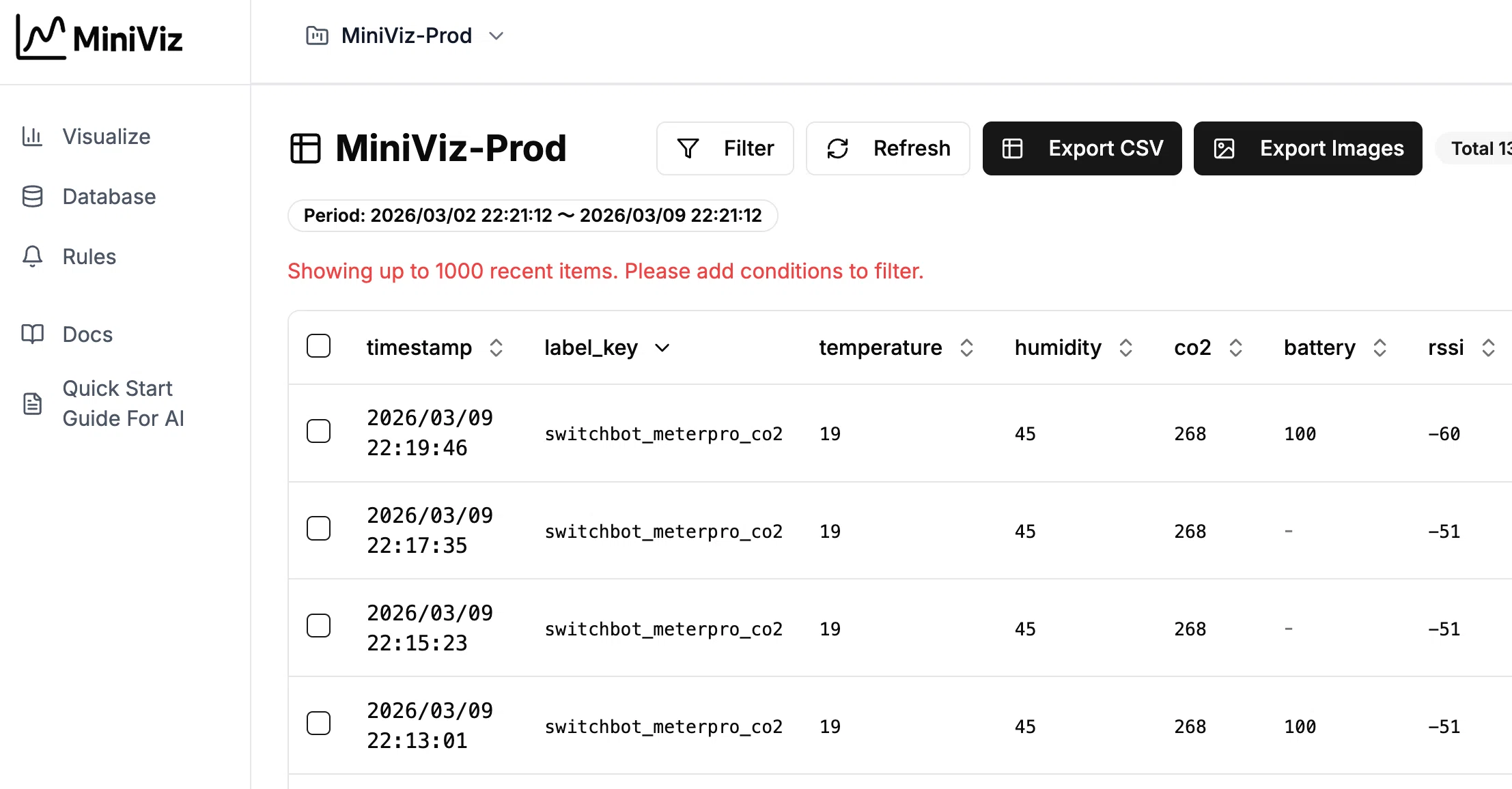
From the Database menu, you can confirm that the data is being stored. You can also export it as CSV.
The main stored fields are:
- Temperature
- Humidity
- CO2
- Battery
- RSSI
Visualization and Graphing
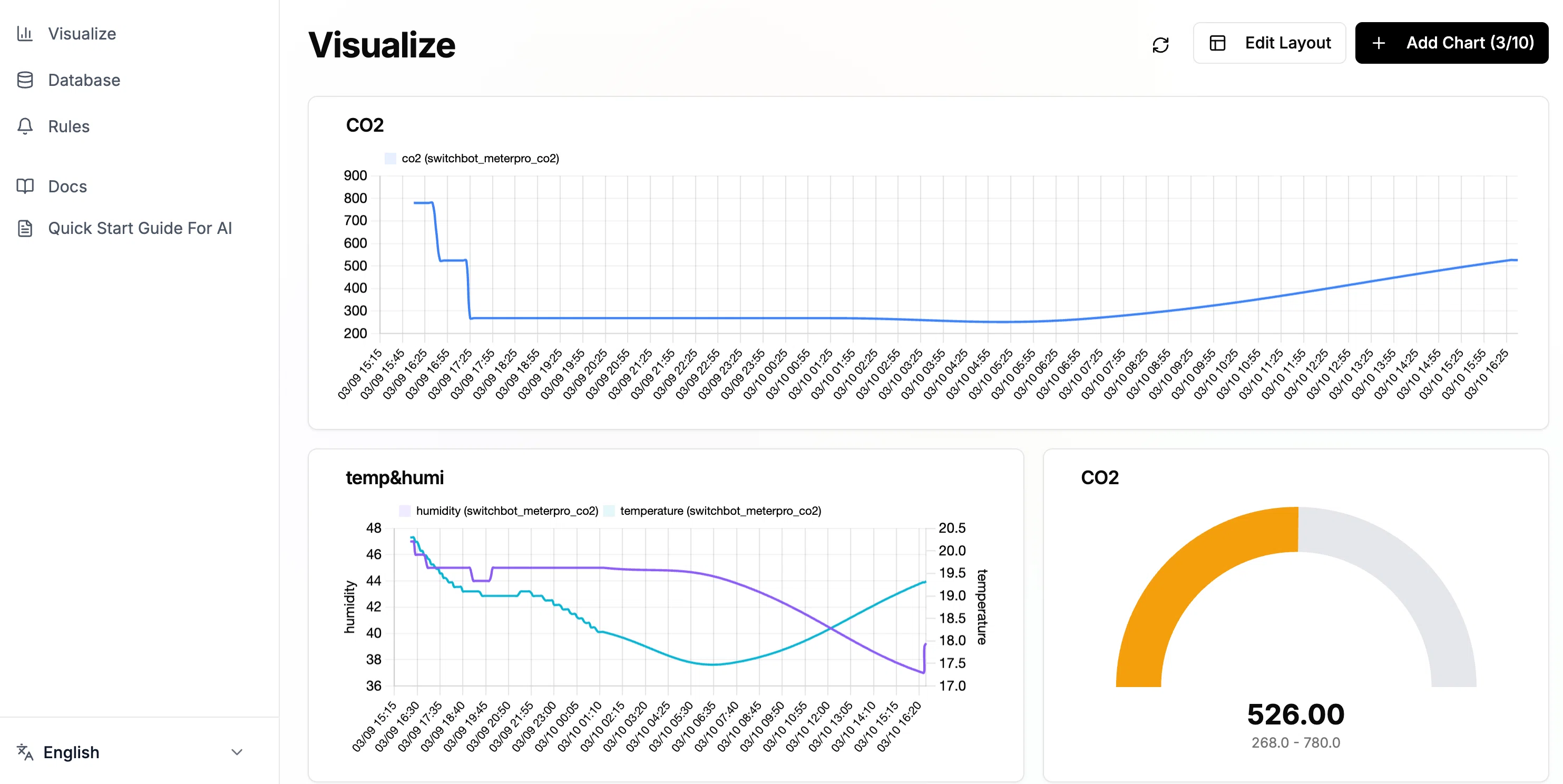
You can freely create graphs from the collected data. If the CO2 value looks too low, also check the sensor calibration status.
Miniviz lets you build your layout freely.